

If you live in a building with a call box, you probably know the routine...
You’re expecting someone
You miss the call box call
Your guest is left waiting
I’ve lived in many places that have had callboxes and it’s always been just a little annoying:
We had to answer every call box call to let a visitor in and most of the time we didn’t know which of us the visitor was going to call
Hosting a party? Don’t loose track of your phone, otherwise someone will be stranded
We occasionally left our phones and key fob inside, locking us out of the building until we could follow a neighbor inside
So naturally, instead of accepting this as “how buildings work” or forcing myself to remember my phone and/or key fob, I built Callbox Concierge.
How it started…
My building’s call box has an entry for both me and my husband. Normally, each of these go straight to our respective cell phones.
I asked the property manager to change my number to a dedicated phone number that routes to my FreePBX server instead.
I was nervous at first, but was feeling better knowing that the number associated with my husband’s name is still his actual cell phone number. So if my plan didn’t work out, we could at least have that until I could switch it back.
Version 1: Just for Us
When a call comes in, FreePBX does the following:
Inbound route checks caller ID
If it matches one of the known call box numbers in my building, it’s sent to a special dial plan.
The dial plan checks Home Assistant
If you’re new to my life, I run Home Assistant for automation.
There’s a virtual switch called Guest Access.
This switch can be toggled:
From Apple Home
From a physical button on our fridge (yes, really)
If Guest Access is ON
The system immediately plays the sound of a “9” button press
That’s the unlock key for our building
Door opens, no interaction required
If Guest Access is OFF
The caller hears a prompt:
Enter an access code or
Press 0 if you don’t have one (for the unexpected guest or delivery driver)
Outcomes:
Valid access code → unlock key plays → door opens
Press 0 → call forwards to a ring group:
Both of our cell phones
Desk IP phones (who doesn’t love a corded phone?)
Notifications
Any time someone is granted access, whether by code or Guest Access, we get:
A visual notification on a display in our kitchen
A paging announcement over the various IP phones
A text message heads-up
At this point, we were both sold.
We barely use access codes anymore. If we’re expecting someone, we just turn Guest Access on.
I honestly can’t imagine not having this now.
“Other People Might Want This…”
As you can imagine, the functionality is sometimes a topic of conversation when people come over. Those who saw the value expressed an interest in having something like this.
The first version, however, was very much built for us, not others.
So I started thinking... Phone numbers from my provider are cheap. Like, shockingly cheap.
So I did what any reasonable person would do:
I rebuilt it from scratch…
Version 2: Callbox Concierge
The new model is built around subscribers.
Each subscriber gets their own dedicated DID (phone number) that they give to their property manager. I call this number their “RainbowLink Number”.
Incoming Call Flow
When a call comes in:
FreePBX identifies the DID as belonging to a subscriber
The dial plan matches the DID to a subscriber record in the database
It checks the subscriber’s current Concierge Mode:
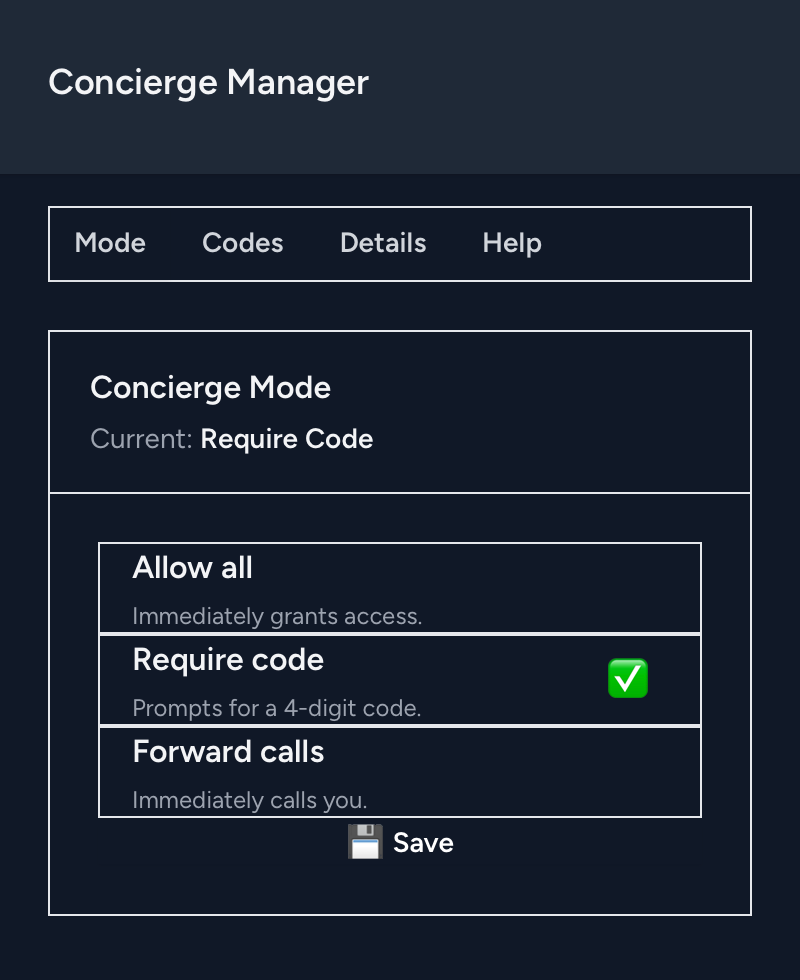
Allow All
Code / Normal
Forward
Concierge Modes Explained
Allow All (Guest Access)
Plays the subscriber’s configured unlock key (usually “9”)
Door opens immediately
Code / Normal Mode
Caller is prompted for an access code or to press 0
Valid code → unlock key plays
Press 0 → call forwards to the subscriber’s configured phone number
They can answer, talk, and press the unlock key themselves
Forward Mode
Concierge is bypassed entirely
Call forwards straight to the subscriber’s phone
Self-Service
Subscribers can manage their system in two different ways.
1. Dial-In Management
Call your RainbowLink Number from your registered cell phone number
Caller ID is verified
Enter a PIN (just in case someone out there is doing Caller ID spoofing)
You’re dropped into an admin menu where you can:
Change the current mode
List access codes
Add or remove codes
2. Concierge Portal (Web)
Manage:
Current mode
Access codes
Subscriber details
Log in using your registered email address
Building the Portal
The original Concierge system was built with:
MariaDB
Python
PHP AGI (the “brain”)
Asterisk dial plans
That handled dial-in management just fine.
But of course… that wasn’t enough.
Concierge Portal
I built a full web interface using Laravel.
This was my first time working with Laravel, and while there was a learning curve, I was pleasantly surprised by how efficient and well-structured it is.
That said:
I am still wrestling with CSS
Overrides don’t always behave how I expect
It looks okay right now. There is absolutely room for improvement. That’s a problem for another day.
Currently:
One user per subscriber, but this would be easy to expand with the current structure
Google-only authentication (no shared passwords)
Multiple admin phone numbers per subscriber are already supported
Multi-user portal access is on the roadmap.
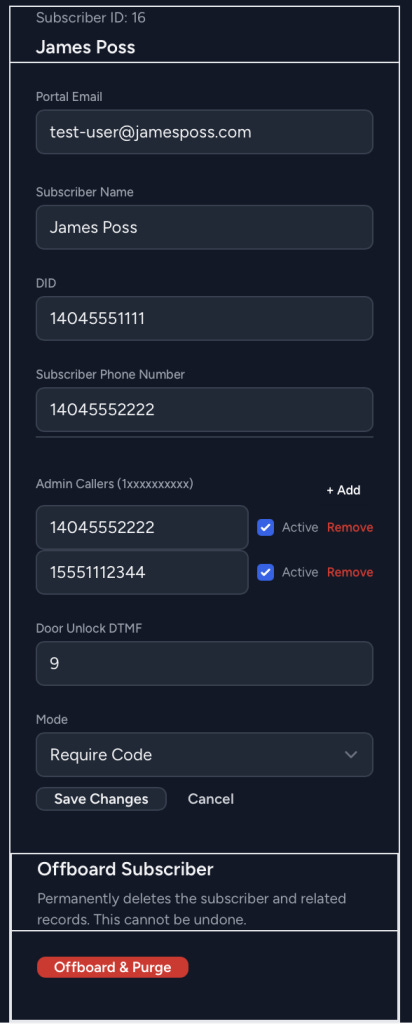
The Admin Side
Once subscribers existed, managing them cleanly became essential. I was not about to be over here manually adjusting things in the database.
Anyway, that lead me to building:
A separate internal Admin Portal, just for me
Used for:
On-boarding
Off-boarding
Managing subscribers
At this point, Concierge became something I could easily manage for as many subscribers as I need.
“But What If the Server Dies?”
Great question, and believe me... I’ve gone through the scenarios in my head...
Could I build but a robust, multi-node, multi-site platform to drastically reduce the downtime risk? Absolutely. But I’m not at the point where full high availability makes sense yet, but:
My PBX already has a warm spare on a VPS
It can handle basic call functionality if my primary site is down
The web portal wouldn’t be available, but calls into the admin menu would still work
Last-Resort Fallback
My phone provider allows a failover forwarding number if both PBXs are unreachable.
Right now, I configure this to forward calls directly to the subscriber’s cell phone, which should prevent almost all full-service interruptions.
Final Thoughts
Callbox Concierge started as a way to stop answering the same phone call over and over.
It turned into:
A custom dial plan
A subscriber platform
A web portal
An admin system
And a fridge button (still my favorite and the most used part)
It works beautifully for us and now it’s built in a way that others can use too.
More to come!